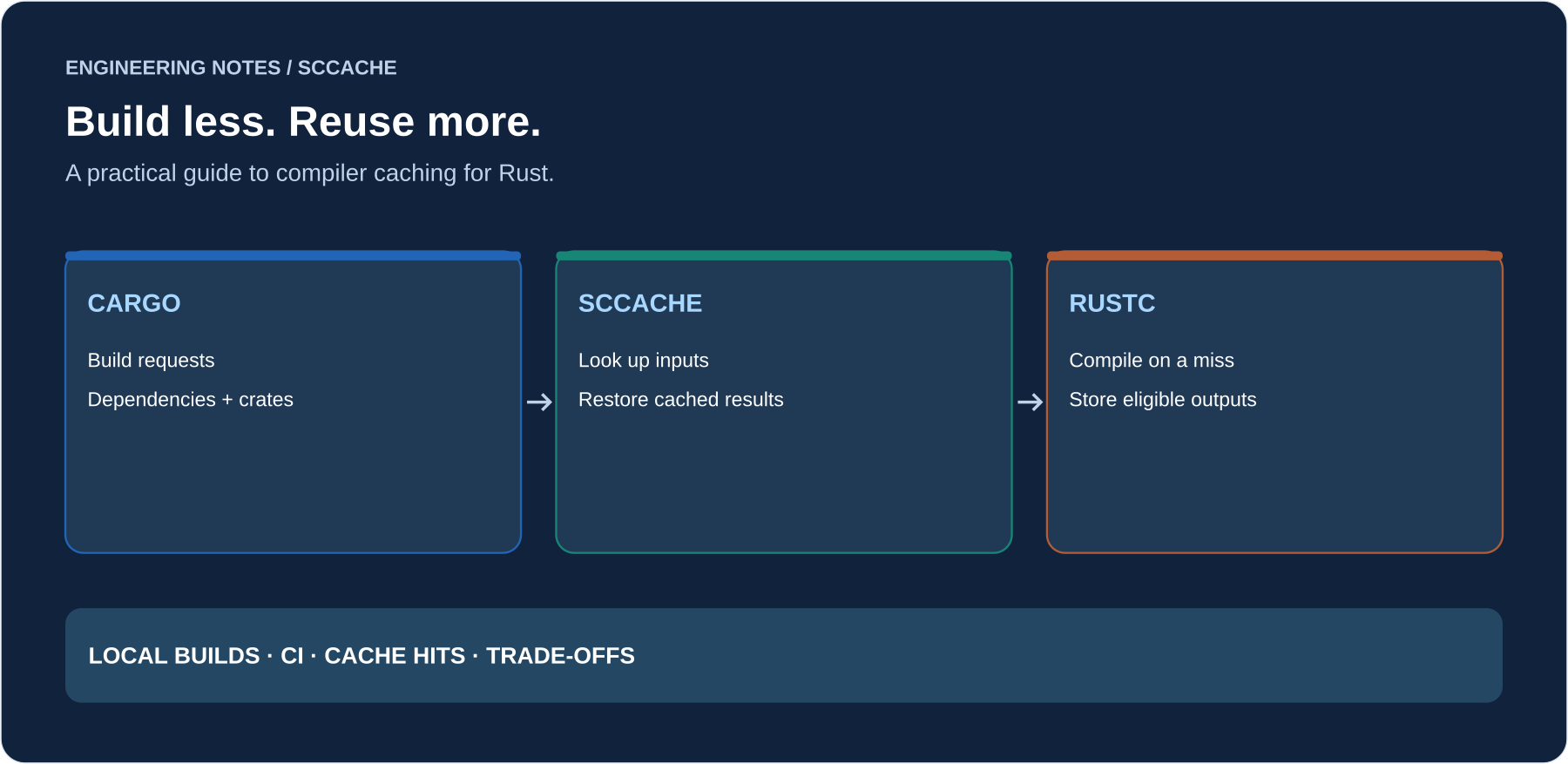
Have you ever changed a few lines of Rust, pushed a branch, and watched CI compile the same dependencies all over again? 😅 On a developer machine, target/ may already contain most of that work. On a fresh CI runner, those files may be gone before the next job even starts.
While working on a Rust service with a sizeable dependency graph, I started looking at what we could reuse between builds. One useful tool was sccache: a compiler wrapper that can save eligible compilation results and reuse them later. The examples below are simplified and use a generic project; the settings and numbers are illustrative, except for the CI comparison near the end, which comes from a real production Rust project.
The short version ⚡
- What it is: sccache is a compiler cache that started at Mozilla. It wraps rustc (and C/C++ compilers), saves the result of each compilation, and hands it back the next time exactly the same compilation comes up, from local disk or from remote storage shared across machines.
- Why use it: it’s especially useful in CI. Every fresh runner starts with an empty
target/and compiles the same dependencies again. sccache keeps compiler results outsidetarget/, so a new runner can reuse them instead of recompiling. After a lockfile change on a production Rust service, our pipeline took 6m 28s with a warm sccache versus 10m 00s with the old archive cache. It helps locally too: the cache survivescargo clean, so a clean rebuild doesn’t start from scratch. - A cache hit avoids the corresponding compiler invocation, but linking, build scripts, and some Rust crate types still do work.
- Each compilation is keyed by its inputs. An edit misses for that crate and the crates that depend on it, and LRU eviction keeps the local cache under its size limit.
- Local incremental compilation and shared compiler caching solve different problems. Choose based on the workflow.
- Measure the entire job, including cache restore and upload. A high hit rate is useful only if the overall build benefits.
What is sccache? 📦
sccache originated at Mozilla — the organization behind the creation of Rust — as a ccache-style shared compiler cache. It sits between a build tool and a compiler, supporting Rust, C/C++, and other compiler families. It can store compilation results on local disk or use supported remote backends so multiple machines can reuse them.
A shared cache lets machines reuse completed compilations. sccache also supports distributed compilation, where work can be executed on remote build machines. They are separate capabilities: the examples here use compiler caching and do not require a distributed compiler cluster.
How sccache works under the hood 🔍
sccache doesn’t make rustc any faster. It saves time by not running rustc for a crate when it has already seen exactly the same compilation. This section answers two questions: how does sccache decide that two compilations are “exactly the same,” and how does it keep stored results from filling the disk? The details describe Rust support in sccache 0.19.0 and can change between versions.
With RUSTC_WRAPPER=sccache, Cargo runs sccache rustc … for every crate it decides to build. That command is a thin client: by default it hands the request to a long-running sccache server in the background, starting one if needed. The server owns the storage connection and the statistics. That’s why --show-stats, --zero-stats, and --stop-server talk to the server, and why settings such as the cache size are read when the server starts.
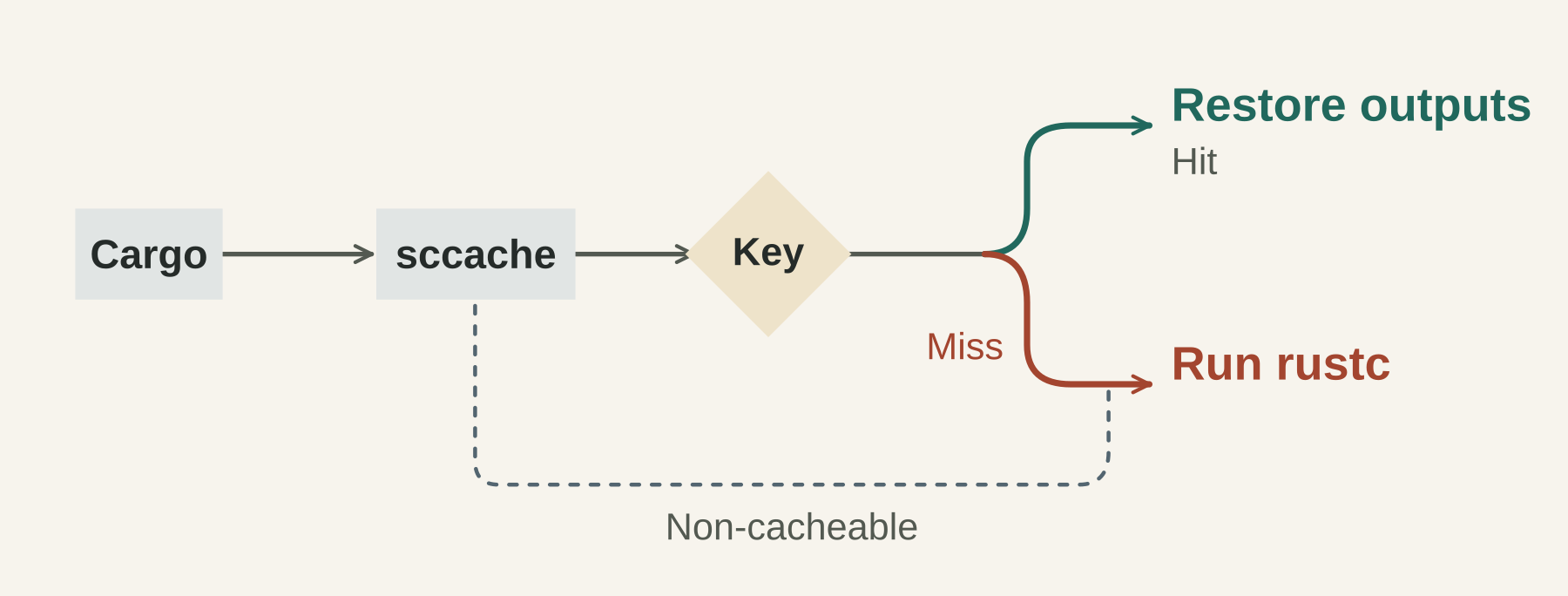
For each request, the server first checks whether it can be cached. If it can, sccache computes a key from the request’s inputs and checks the configured storage. On a hit, it restores the stored outputs. On a miss, it invokes the compiler and can save an eligible successful result. A request that cannot be cached passes through to the compiler. See the architecture documentation.
This is a compiler cache, so it does not know that a whole pipeline is “the same.” It evaluates individual compilation requests. Changing a compiler, feature, target, profile, flags, source, or other relevant input can cause a miss. That is useful: an older result should not be reused when the compilation meaningfully changes.
Which compilations are cacheable? ✅
Being a dependency is not enough. In sccache 0.19.0, a typical Rust library compilation with incremental mode disabled can be cached when its arguments and outputs meet the supported rules. Incremental compilations and crate types that invoke the system linker, such as bin, dylib, cdylib, and proc-macro, bypass caching. Build-script execution, linking, and running tests still take time. See the Rust cacheability rules.
What goes into the cache key? 🔑
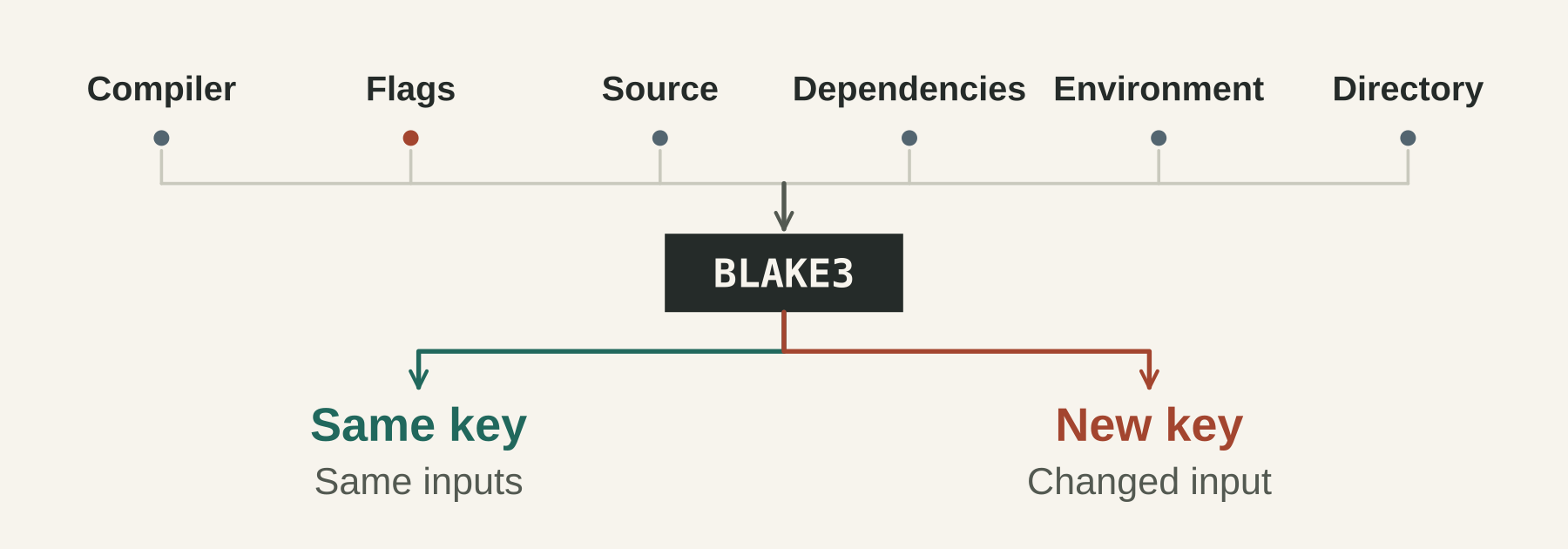
The key has to change whenever the output could change, so the key represents a compilation, not just a crate name and version. Before hashing, sccache asks rustc for the crate’s dependency information (--emit dep-info). That lists every file the crate reads, including modules and files pulled in with include_str!, plus environment variables read with env!. sccache then hashes these inputs with blake3:
- Compiler: the rustc version and the libraries in its sysroot. A toolchain update means new keys.
- Arguments: crate name, edition,
--cfgvalues such as enabled features, optimization level, target, and codegen flags. Output locations such as--out-dirand-Lsearch paths are left out. - Source files: the contents of every file in the dep-info list.
- Dependencies: the contents of every
--externcrate (.rlibor.rmeta) the crate compiles against. - Environment:
CARGO_*variables, except a few such asCARGO_BUILD_JOBSandCARGO_MAKEFLAGS, plus the values of variables read withenv!. - Working directory: where rustc runs. This is one reason a stable CI checkout path matters.
Nothing in the cache is edited in place. A changed input selects a different key, which may not have an entry yet; it doesn’t delete the old entry. That older result can still be useful when a branch or its inputs return to a previous state. This list simplifies the Rust key-generation implementation; see also the hashing documentation.
Hit or miss: where the time goes ⏱️
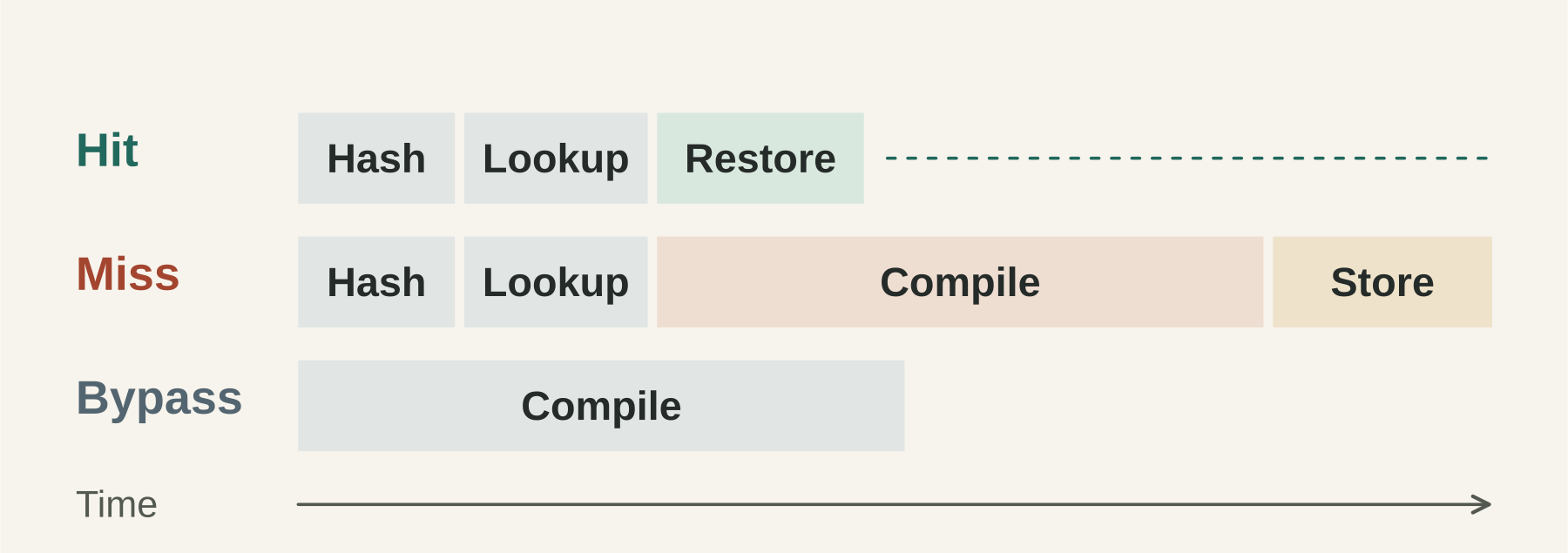
A miss does slightly more work than plain rustc. sccache runs rustc once for dep-info, reads and hashes every input, runs the real compilation, and then compresses and stores the result. A hit does the same hashing and lookup, then skips the compilation entirely. The saving per hit is roughly that crate’s compile time minus the restore time, so large, slow-to-compile dependencies benefit the most.
Each entry is a small archive: compiled outputs such as .rlib and .rmeta, compressed with zstd, plus rustc’s stdout and stderr. On a hit, sccache writes the files where Cargo expects them and replays the compiler messages, so warnings from a cached workspace crate still show up. Requests that aren’t cacheable go straight to rustc and store nothing.
Why one edit doesn’t rebuild everything 🕸️
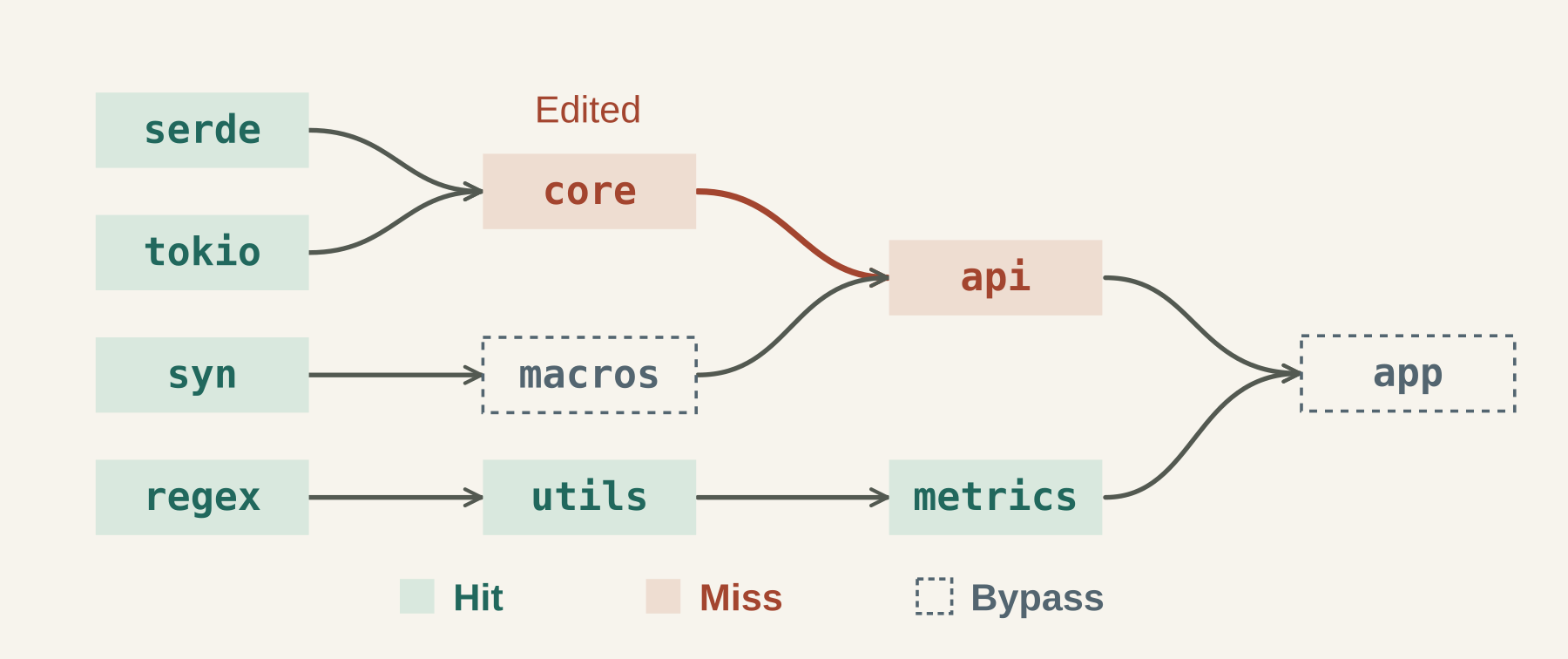
Picture a fresh CI runner with an empty target/ and a warm sccache, running a commit that only edited the workspace crate core. Cargo has no outputs, so it asks for every crate. Each request is checked on its own:
- Third-party crates and untouched workspace libraries have the same inputs as before: hit.
corehas a changed source file: miss.apiwasn’t edited, but it compiles againstcore’s new.rlib. That dependency’s contents are part ofapi’s key, so it’s a miss too. Changes ripple downstream.- The
macrosprocedural macro and theappbinary invoke the linker, so they are always compiled.
Hits ripple too. A hit restores byte-for-byte the output that was stored, so crates further down still see the same dependency contents and keep matching. The remaining work is roughly “what changed, everything downstream of it, and whatever can’t be cached.” That’s also why editing a crate near the bottom of the graph, bumping a widely used dependency, or changing the toolchain or flags costs far more than editing a leaf crate.
A Cargo.lock edit therefore does not automatically empty sccache: unaffected compilations can still hit. Conversely, an unchanged crate version does not guarantee a hit if its compiler, features, or other inputs differ. Even an unchanged key misses if the entry was never saved or has been evicted.
How the cache stays within its size limit 🧹
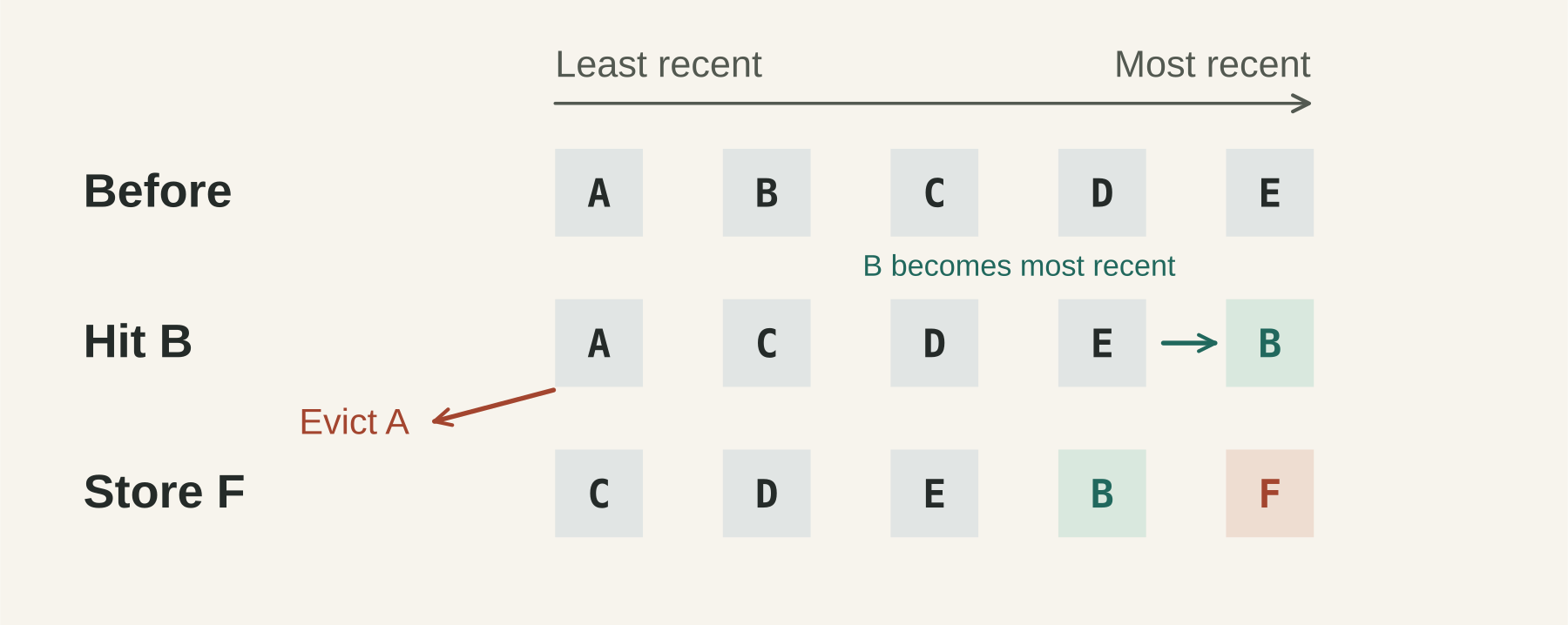
Changed inputs and disk cleanup are separate mechanisms. A new key never deletes anything; space is reclaimed only when the cache fills up. For the local disk cache, every entry is a file under SCCACHE_DIR. The server keeps a running total against SCCACHE_CACHE_SIZE (10 GB by default; the examples below use 2 GB) and orders entries by when they were last used, known as least recently used (LRU) eviction:
- A hit marks the entry as most recently used. sccache also updates the file’s modification time, so the order survives a server restart.
- Before storing a new entry, the server checks whether it fits under the limit.
- If it doesn’t, the server deletes the least recently used entries until it fits, then stores the new one. An entry larger than the whole limit is not stored. If an evicted result is needed later, that compilation misses and runs again.
There’s no separate cleanup job to run. Entries that builds keep hitting stay warm, while results for old toolchains, flags, or dependency versions age out on their own. The catch is a limit that’s too small. If one clean build produces more entries than the cache can hold, the earliest entries are evicted before the next build reaches them, and hits collapse. Size the cache to hold at least one full build for each configuration you want to keep warm (profile, target, and toolchain), then compare the cache size with the maximum in sccache --show-stats. See the local-cache settings and LRU storage implementation.
This limit does not clean target/, Cargo’s downloaded sources, or old cache archives retained by the CI provider. It also applies only to the local disk cache. With remote storage, retention is configured on the backend: for example, Redis maxmemory with the allkeys-lru policy or SCCACHE_REDIS_EXPIRATION, lifecycle rules on an object-storage bucket, or the CI platform’s own cache retention. In the CI example below, the archive is a copy of the local SCCACHE_DIR, so SCCACHE_CACHE_SIZE also bounds what each job restores and uploads.
Cargo, incremental compilation, and sccache are different 🧩
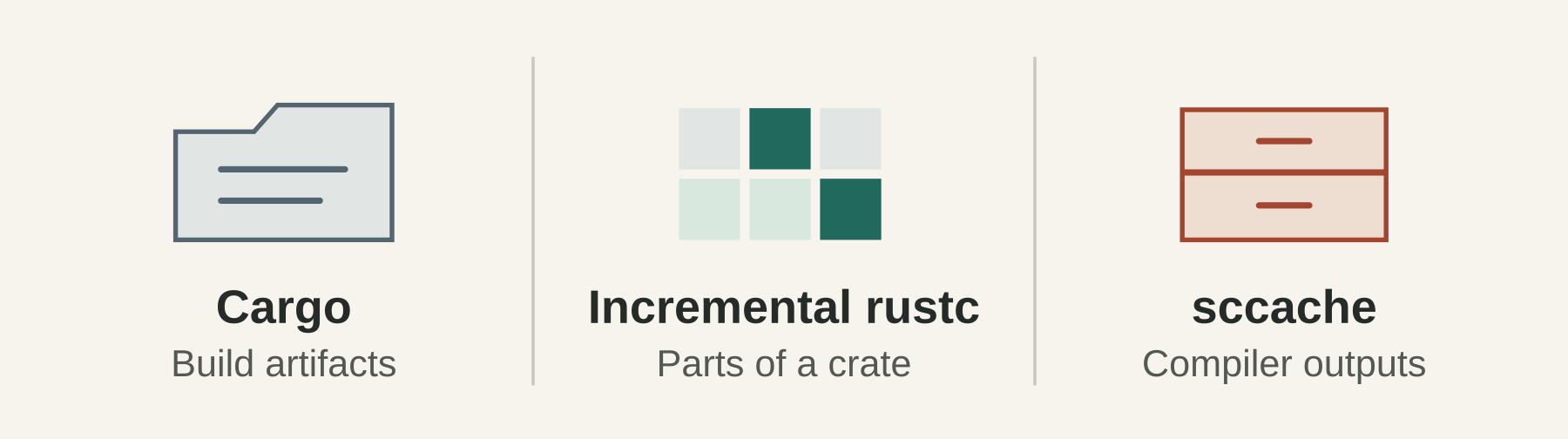
Cargo outputs: Cargo keeps artifacts and fingerprints under target/. If it decides a unit is fresh, it can skip invoking rustc entirely. Running cargo build twice without changes may show zero new sccache hits simply because Cargo never asked the compiler to run.
Rust incremental compilation: rustc can reuse parts of a crate between edits. This is useful for the local edit/build loop, especially for workspace crates. In the Rust support described for sccache 0.19.0, incremental compilations are not eligible for caching. Dependencies that are compiled without incremental mode can still be cached.
sccache: saves eligible compiler results separately from target/. After a clean or on a new runner with access to the cache, Cargo can ask for compilation again and sccache may restore matching results. It does not replace Cargo’s dependency downloads or guarantee every crate is cacheable. See the Rust caveats.
For a local edit loop, keeping incremental compilation enabled is a reasonable default. For a clean-build-oriented CI job, CARGO_INCREMENTAL=0 makes eligible workspace library compilations available to sccache. Benchmark both choices for your workload rather than assuming one wins everywhere.
Try it locally 🛠️
Install sccache using a package manager or the official release instructions. For example, on macOS:
brew install sccache
sccache --version
Enable it for the current shell and build a Rust project:
export RUSTC_WRAPPER=sccache
export SCCACHE_CACHE_SIZE=2G
cargo build
sccache --show-stats
SCCACHE_CACHE_SIZE controls the local cache limit; SCCACHE_DIR selects a local directory. These examples use 2 GB as an illustrative limit. Settings used by the server should be set before it starts; stop and restart the server when changing them. sccache --zero-stats resets counters, not the stored cache. sccache --stop-server stops the background server. See local storage configuration.
Keeping local build artifacts under control 🧹
Keeping incremental compilation enabled makes the edit/build loop pleasant, but target/ can grow as profiles, dependencies, and incremental artifacts accumulate. Check its size from the workspace root with du -sh target (if you use Cargo’s default target directory). When you need the disk space, preview the cleanup and then clean:
cargo clean --dry-run
cargo clean
Run this from the intended workspace: without options, cargo clean removes the entire configured target directory, including compiled binaries and incremental state, not just old incremental files. A workspace or CARGO_TARGET_DIR setting can make that directory different from ./target. Don’t keep irreplaceable files there. Cargo also supports narrower options such as --release or -p package-name.
The next build has to recreate those outputs and loses its incremental starting point, so expect extra work. The separate sccache storage is normally unaffected, and eligible requests may hit it after the clean; incremental compilations, linking, and other non-cacheable work still run. If you explicitly put the sccache directory inside target/, cleaning removes that cache too. Clean when space or troubleshooting calls for it, rather than after every build. 🦀
A cold and warm experiment 🧪
Use a disposable directory and an isolated server port. This example creates a new library and cleans only that demo project. It keeps the checkout path and compiler settings constant:
demo_root=$(mktemp -d)
cd "$demo_root"
cargo new --lib cache-demo
cd cache-demo
export SCCACHE_SERVER_PORT=4249
export SCCACHE_DIR="$demo_root/cache"
export SCCACHE_CACHE_SIZE=2G
export RUSTC_WRAPPER=sccache
export CARGO_INCREMENTAL=0
sccache --start-server
sccache --zero-stats
cargo build
sccache --show-stats
cargo clean
sccache --zero-stats
cargo build
sccache --show-stats
sccache --stop-server
For a truly cold first run, use a fresh cache directory and an unused port. The first build should record a miss for the eligible library; after cleaning its target/, the second should show a hit. Compare the stats rather than only wall time: this tiny example is for observing behavior, not a meaningful performance benchmark. If you simply build twice without cargo clean, Cargo may report the unit as fresh and sccache may see no new request.
Bring it into CI 🚀
A runner can start with an empty filesystem each time, so the cache directory must survive the job. One approach is to archive it with the CI provider’s cache mechanism. Keep downloaded Cargo sources and compiler results in separate caches: downloading a crate and compiling it are different kinds of work. Scope compiler archives by architecture and job purpose when jobs use different targets or flags.
A GitLab CI example
The following generic GitLab CI example installs a pinned public release using Cargo. The first install itself takes time; caching the binary avoids repeating that setup. Adjust the Rust image and package prerequisites for your project.
rust-test:
  image: rust:1
  variables:
    CARGO_HOME: "$CI_PROJECT_DIR/.cargo"
    SCCACHE_DIR: "$CI_PROJECT_DIR/.sccache"
    SCCACHE_CACHE_SIZE: "2G"
    CARGO_INCREMENTAL: "0"
  cache:
    - key: "cargo-downloads-$CI_RUNNER_EXECUTABLE_ARCH"
      paths:
        - .cargo/registry/index/
        - .cargo/registry/cache/
        - .cargo/git/db/
    - key: "sccache-tool-0.19.0-$CI_RUNNER_EXECUTABLE_ARCH"
      paths:
        - .cargo/bin/sccache
    - key: "compiler-$CI_RUNNER_EXECUTABLE_ARCH-$CI_JOB_NAME"
      paths:
        - .sccache/
  script:
    - |
      set -e
      mkdir -p "$CARGO_HOME/bin"
      if ! "$CARGO_HOME/bin/sccache" --version 2>/dev/null | grep -q '^sccache 0\.19\.0$'; then
        cargo install sccache --version 0.19.0 --locked --root "$CARGO_HOME"
      fi
      export RUSTC_WRAPPER="$CARGO_HOME/bin/sccache"
      "$RUSTC_WRAPPER" --start-server
      "$RUSTC_WRAPPER" --zero-stats
      trap 'status=$?; "$RUSTC_WRAPPER" --show-stats || true; "$RUSTC_WRAPPER" --stop-server || true; exit "$status"' EXIT
      cargo test --locked
The EXIT trap prints statistics and stops the server in the same shell, even if tests fail, while retaining the original exit status. It runs before the job’s cache upload. Test this lifecycle with your runner: daemon shutdown behavior can vary. An archive key controls which collection is restored; sccache still checks individual entries. A stable key can retain useful results across dependency updates, while the cache’s size limit bounds disk use.
Parallel jobs writing the same archive can replace one another’s uploaded cache. Scoping jobs or coordinating writers can improve reuse, but it doesn’t make a stale entry correct: sccache still checks its own keys. Measure cache extraction and upload too; a huge archive can cost more than the compilation it saves.
What happened after a lockfile change? 📊
These numbers come from a real production Rust prediction service. In one CI experiment, we compared the old archive-based setup with the revised sccache setup after the same lockfile change. The old setup had a cold archive cache; the revised setup restored an existing compiler cache. Both runs passed the same test suite.
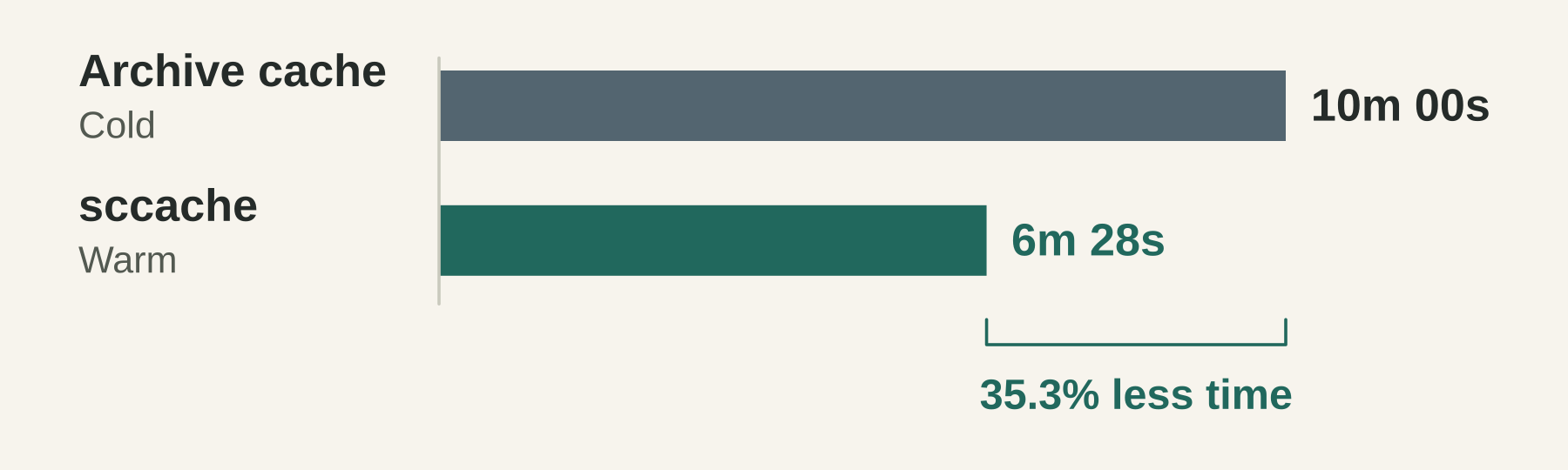
- Pipeline wall time: 10m 00s → 6m 28s
- Time saved: 3m 32s, or 35.3% in this comparison
This is precisely the situation we wanted to understand: a lockfile change caused the old archive key to miss, while sccache could still reuse eligible compilations. The revised setup also changed how caches were handled, so the result is for the overall CI configuration, not an isolated benchmark of sccache alone. The measurements are individual runs on shared autoscaling runners and include job startup, cache transfers, and other pipeline work. They are not an average or a guarantee for every lockfile change. With an empty sccache, the first run still needs to compile. 😅
Docker builds: where cargo-chef fits 🐳
Docker’s layer cache works at a different level from sccache. With a simple COPY . . followed by cargo build, a source change can invalidate the build layer, so the container may need to compile dependencies again. cargo-chef separates dependency preparation from the final application build to make the dependency layer reusable.
cargo chef prepare creates a recipe.json from the project’s manifests and lockfile. cargo chef cook uses that recipe to build the dependency skeleton before the real source is copied into the builder. If the recipe and the other inputs to that Docker layer are unchanged and the builder has that layer available, Docker can reuse it when application source changes.
Here’s a generic multi-stage example for a Rust project with a binary named app:
FROM lukemathwalker/cargo-chef:latest-rust-1 AS chef
WORKDIR /app

FROM chef AS planner
COPY . .
RUN cargo chef prepare --recipe-path recipe.json

FROM chef AS builder
COPY --from=planner /app/recipe.json recipe.json
RUN cargo chef cook --release --recipe-path recipe.json
COPY . .
RUN cargo build --release --bin app
This example ends at the builder stage; add a runtime stage suited to your binary and its system libraries. Put target/ and .git/ in .dockerignore so local build artifacts are not copied over the container’s outputs. Keep the Rust version, working directory, build profile, target, and relevant features compatible between cook and the final build. Pin the toolchain and image version for reproducible builds. Workspace path dependencies, build scripts, and native libraries may need additional project-specific setup.
Can cargo-chef and sccache work together? Yes. cargo-chef helps Docker reuse a dependency layer; sccache can reuse eligible compiler results when compilation actually runs. The Dockerfile above demonstrates cargo-chef only: adding sccache requires installing/configuring the wrapper inside the build and making its cache available to that build. An ephemeral CI builder also needs access to a retained or exported/imported Docker layer cache; a fresh builder won’t magically have previous layers. Measure both approaches and their combined restore/upload costs before adding complexity.
Why didn’t that compile hit the cache? 🤔
- Cargo already considers it fresh: no compiler request means no additional sccache hit. Use the isolated clean-build experiment above.
- Incremental is enabled: eligible non-incremental dependencies may hit while incremental workspace crates do not. Disable incremental for a controlled comparison.
- The request is not cacheable: in v0.19.0, crate types that invoke the system linker, including binaries and procedural macros, are not cached. Build scripts, linking, and test execution can still take time. Procedural macros that read files have additional correctness caveats; consult the Rust documentation.
- Inputs differ: toolchain, target architecture, features, profile, flags, source paths, or environment can change the key. Keep CI checkout paths stable and compare like with like; path handling is version-specific.
- Native code has another compiler: Rust dependencies may compile C/C++. Configure compatible compiler wrappers or CMake compiler launchers as needed. Coverage tools may provide their own Rust wrapper, so verify wrapper composition and native compiler settings rather than assuming
RUSTC_WRAPPERcovers everything. - Cache transport dominates: compare cold and warm total duration, including install, archive restore/upload, and test execution. Also watch cache misses, non-cacheable calls, errors, and eviction.
What I would take away 💡
Start with the developer loop and CI job you actually have. Turn on the wrapper, understand which compilation requests are eligible, then compare clean builds under the same conditions. A cache is useful when the repeated compilation it avoids outweighs the time spent uploading it to and downloading it from object storage.
The best result isn’t a perfect hit percentage. It’s getting useful feedback sooner, with builds that are still correct and understandable. 🦀
References 📚
sccache (v0.19.0)
- mozilla/sccache: the main repository, with the README and installation guide
- Architecture and How caching works: how a request flows and how cache keys are computed
- Rust caveats: Rust-specific limits, such as incremental compilation and crate types that are not cached
- Local storage and Configuration:
SCCACHE_DIR,SCCACHE_CACHE_SIZE, and other settings - Distributed sccache: distributed compilation, which this article does not cover in detail
Cargo
- Build cache: the layout of
target/, plus a shared cache section that points to sccache - Environment variables:
RUSTC_WRAPPER,CARGO_INCREMENTAL, andCARGO_TARGET_DIR - Profiles: incremental: the default incremental setting for each profile
- Caching the Cargo home in CI: which
CARGO_HOMEdirectories are worth caching cargo clean
CI and Docker